


Child Reward
4.4133.00 Reviews
App Specs
- Version
- 4.8.2
- Updated On
- License
- Free
- Downloads
- 100,000+
- Developer
- Bartosz Smyk
- Categories
- Parenting
- Platform
- Android
Screenshots

 Analysis by AppCompare
When a child knows what needs doing but still needs a reminder, a visible task-and-reward routine can make the day feel less like a string of negotiations. I tried Child Reward as a parenting app for that kind of moment: its central idea is to let a parent assign tasks, attach points, and connect those points to rewards a child can work toward. I like the simplicity of that arrangement, though it works best when the family agrees on clear, realistic expectations before the first task is added.
Getting Started with Child Reward
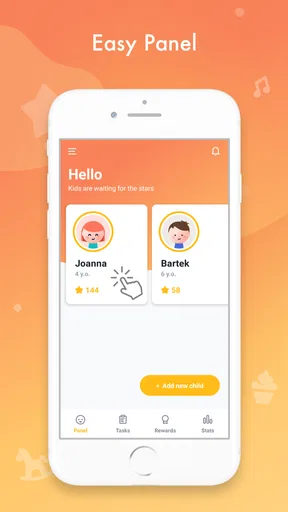
First things first, setting up Child Reward is a breeze. Once you download it, you’re greeted with a colorful and intuitive interface that immediately grabs the attention of both adults and kids. Creating profiles for each child is straightforward, and you can customize tasks based on your family’s needs.
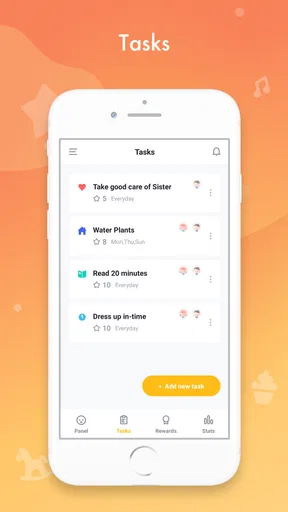
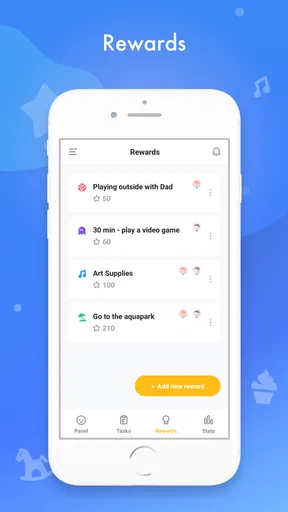
The app allows you to assign different tasks and set up rewards that your child can earn upon completion. Think of it as a virtual star chart, but with a lot more pizzazz. From making their bed to completing homework, you can list any task you want your child to tackle. What’s really neat is the ability to assign points to each task, motivating kids to earn their rewards.
Making the First Routine Manageable
For a first run, I would resist the temptation to enter every chore in the house. Pick one predictable task your child can complete with little help, such as putting toys away before bedtime, and one that needs a gentle nudge, such as packing a school bag. A short list makes it easier for a child to understand what success looks like, and it gives you a fair chance to see whether the routine fits your household.
Set the reward before the points begin to accumulate. A reward should be something your family can actually deliver when it is earned, not an appealing promise that later becomes awkward to schedule. Small privileges or a shared activity can be easier to honor than a large treat. I’d also explain whether a task earns points every time or only once in a day, so there is less room for disagreement when a child asks for credit.
This is a useful distinction from a paper chart: a chart can be quicker to draw up, but it may not make the connection between several tasks and a chosen reward as visible. Child Reward gives parents a place to organize that exchange. The trade-off is that you need to keep the app current; if a task changes or a reward is no longer available, an outdated setup can create more confusion than a simple chart on the fridge.
The Fun Part: Earning Rewards
Here’s where Child Reward truly shines. The app lets you set various rewards that kids can redeem with the points they earn. Whether it’s extra screen time, a trip to the zoo, or a new toy, the possibilities are endless. I found that this method really engaged my little ones and made them more eager to help out around the house.
Worth Reading Before You Choose

Flipboard Shows What News Apps Must Do Beyond the Feed

Switching to Android Auto Means Rethinking Your Driving Routine

Google Calendar Makes a Crowded Week Easier to Manage

Ludo King Makes the Most of the Minutes Between Plans

Baby Panda World Brings Quick Play to Modern Phones, but Its Game Library Feels Busy

ESPN’s Live Game View Makes Following Close Games Easier
What’s even better is the level of customization available. You can adjust tasks and rewards as your child grows, ensuring the app remains relevant and engaging. This kind of flexibility is a major win in my book.
Choosing Rewards That Last Beyond the First Week
In everyday use, I’d treat rewards as a way to make effort visible rather than as a price tag on every helpful action. If every small act turns into a negotiation about points, children may focus on bargaining instead of building a routine. A practical balance is to reserve points for a few agreed tasks while continuing to recognize ordinary cooperation with a thank-you or a conversation.
It also helps to make the reward menu varied without making it complicated. A child who is saving for one larger reward may need patience, while a smaller, attainable option can give a younger child a nearer goal. Before choosing, consider what your week actually looks like: a family outing is a poor reward if there is no realistic time to take it, and extra screen time may not suit a household that is trying to keep evenings calm.
Compared with giving a child an allowance, a task-and-points system can keep attention on specific routines rather than treating every chore as paid work. Compared with verbal reminders alone, it can make expectations easier to revisit without repeating the same instruction. Neither approach is automatically better for every family. If your child responds badly to points or sees rewards as pressure, a shared checklist and encouragement may be a kinder fit.
Tracking Progress Made Easy
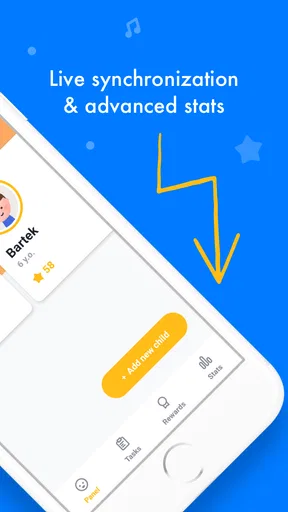
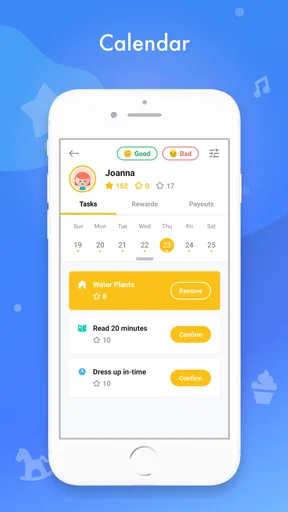
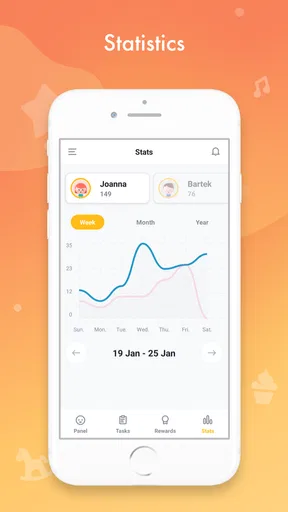
The app includes a handy progress tracker, which is fantastic for both parents and kids. You can see at a glance how many points each child has earned and what tasks are still pending. This transparency helps kids take responsibility for their actions and holds them accountable in a fun way.
The app also provides insightful reports and summaries, making it easy to track your child’s development over time. It’s like having a personal assistant that keeps you informed about your child’s achievements.
A Realistic School-Day Example
Picture a busy weekday morning: one child needs to get dressed, put breakfast dishes away, and leave on time. Rather than turning the app into a live scoreboard while everyone is rushing, I’d agree on a simple routine the evening before and use the task list as a reminder. Later, when there is time to check what was completed, you can recognize progress calmly and resolve any missed task without making the doorway a point-by-point debate.
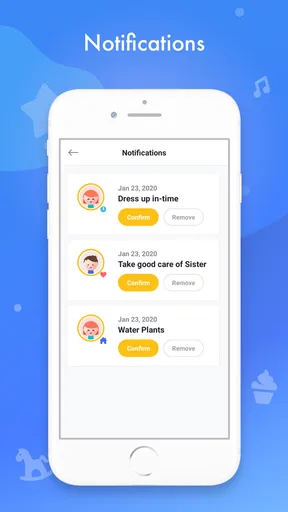
That workflow is one of the more useful ways to approach a reward app: let it support a family conversation, not replace one. If a child says a task was finished but it is still pending, decide together how to handle it and keep the rule consistent next time. The tracker can make the disagreement concrete, but a parent still has to use judgment about whether a task was done properly or whether a child needed help.
For more than one child, I would keep expectations age-appropriate rather than copying an identical list across profiles. A younger child may need a task broken into a smaller action, while an older one may be ready to take responsibility for the whole routine. The point system can help each child see their own progress, but it should not become a public ranking that invites sibling comparisons.
Common Snags and How I’d Handle Them
The main friction is not complicated technology; it is deciding what counts. “Clean your room” can mean very different things to a child and a parent. I’d write tasks in observable terms, such as putting books back on the shelf or placing laundry in the hamper, so the child can tell when the job is finished. Clear wording also makes it easier to award points consistently.
Another possible snag is forgetting to check in. A task system only feels reliable if adults review it regularly and follow through on earned rewards. If you are already stretched thin and do not want another routine to maintain, a basic verbal agreement may be easier. I would also avoid changing point values in the middle of a goal unless you explain why; otherwise, the child may feel that the finish line has moved.
Parents may wonder whether the app can solve resistance on its own. I would not expect it to. It can give a child a clear target and make progress easier to see, but it cannot decide which responsibilities are appropriate, settle a disagreement about effort, or replace a calm reminder. The best results are likely when the adult stays involved and uses the system consistently rather than handing the whole job to a screen.
Why Kids and Parents Love It
As a parent, what I appreciate most about Child Reward is its ability to transform mundane tasks into exciting challenges. It’s not just about getting chores done; it’s about fostering a sense of responsibility and accomplishment in children. The app encourages positive behavior without the usual nagging, which is a win-win for everyone involved.
My kids? They love it because it feels like they’re playing a game. The visual appeal and the thrill of earning points and rewards make everyday tasks something they look forward to. It’s a creative way to instill good habits without them even realizing it.
Who It Suits, and What to Check Before Installing
I’d recommend this approach to a parent who wants a concrete way to set household expectations, especially when a child enjoys collecting points and working toward a chosen privilege. It may also help families whose reminders are inconsistent: agreeing on the same short list together can make it easier for adults to respond in a steady way. It is less suitable if you want a fully hands-off solution, or if rewards tend to trigger arguments in your home.
Child Reward is a free app from developer Bartosz Smyk, in the parenting category. It has an average rating of 4.3 from around 1.1K ratings, with about 130 written reviews, and has passed 100K installs. It is rated for Everyone, was released on July 10, 2019, and its current version is 4.8.2, with Android 6.0 as the minimum operating system. Optional in-app purchases range from $1.99 to $4.99 per item, so I’d check the purchase details before choosing anything paid; the core download is free.
If you are deciding between this and a paper reward chart, ask what problem you actually want to solve. A paper chart is easy to see in a shared space and needs no device, while this app offers a digital place to organize tasks, points, and rewards. If your family already uses a routine that works, there may be no reason to switch. If the chart keeps getting lost or the reward goal is hard to track, the app’s structure could be worth trying.
Final Thoughts
All in all, Child Reward is a fantastic tool for any parent looking to make daily routines more engaging for their kids. It combines practicality with a sprinkle of fun, creating a harmonious balance that benefits both parents and children. If you’ve been on the hunt for a way to motivate your little ones, give Child Reward a try. It might just become your new best friend in parenting.
My practical suggestion is to begin with a small routine, agree on what earns points, and choose a reward you can deliver without stress. Give the child a chance to understand the system before adding more tasks, then adjust it if the points are distracting from the habit you want to build. Used with that kind of restraint, it can be a helpful prompt for family routines; used as a substitute for attention or follow-through, it is unlikely to fix the underlying problem.
Pros
- User-friendly interface for easy navigation.
- Customizable rewards to fit family needs.
- Encourages positive behavior in children.
- Supports multiple profiles for siblings.
- Tracks progress with visual charts.
Cons
- Limited free features in basic version.
- No offline mode available.
- Occasional sync issues reported.
- Requires parental setup time.
- Ads can be intrusive in free version.
FAQs for Child Reward
What is Child Reward and how does it work?
Child Reward is an app designed to help parents motivate their children through a system of rewards for completing tasks and chores. Parents can set up tasks, assign points for completion, and allow children to redeem these points for rewards. It's a great tool to encourage responsibility and discipline in kids while making the process fun.
Is the Child Reward app safe for my child to use?
Yes, Child Reward prioritizes safety and privacy. The app requires parental setup and supervision, ensuring that only authorized users can access the child's profile and data. It does not collect unnecessary information, and any data shared is solely for the purpose of enhancing the user experience.
Can Child Reward be used by multiple children in the same family?
Absolutely. Child Reward supports multiple profiles, allowing parents to manage tasks and rewards for each child individually. This feature ensures that each child can have personalized tasks and rewards, making it suitable for families with more than one child.
Does Child Reward require an internet connection to function?
While Child Reward can operate offline for managing tasks and rewards, an internet connection is needed for initial setup, updates, and any features that involve synchronization or online support. This flexibility allows for continuous use even when offline.
Are there in-app purchases or advertisements in Child Reward?
Child Reward offers a free version with essential features. However, there may be in-app purchases available for premium features that enhance the experience, such as additional reward options or advanced tracking tools. The app is designed to be free from distracting advertisements to ensure a smooth user experience for both parents and children.


